How to Create a PayPal.Me Link for Person-to-Person Donations
If you want to receive person-to-person payments through PayPal, a PayPal.Me link gives you a simple way to share your payment information without needing to provide your email address or phone number. Your PayPal.Me link can be shared with supporters who want to send you money directly through PayPal.
For FreeFunder users, a PayPal.Me link can also be used for off-platform donations. If you'd like to learn more about how off-platform donations work, see our guide: https://www.freefunder.com/blog/really-truly-free-personal-crowdfunding
This guide walks through how to create a PayPal.Me link or find your existing one.
What Is a PayPal.Me Link?
A PayPal.Me link is a personal payment link connected to your PayPal account. Instead of sharing your PayPal email address, you can share a link like:
paypal.me/YourName
When someone opens your link, they can enter the amount they want to send and complete the payment through PayPal.
Before You Start
To create a PayPal.Me link, you’ll need:
- A PayPal account
- Access to your PayPal account settings
- A PayPal.Me username that is available
PayPal.Me links are unique, so your preferred name may already be taken. Once a PayPal.Me link is created, it generally cannot be changed, so choose carefully.
How to Create a PayPal.Me Link
Step 1: Go to PayPal.Me
Visit the PayPal.Me website and select the option to create your link.
If you already have a PayPal account, sign in when prompted. If you do not have an account yet, you can create one first.
Step 2: Choose Your PayPal.Me Username
PayPal will ask you to choose the name that will appear in your payment link.
For example:
paypal.me/JaneSmith
or
paypal.me/JanesFund
Choose something that is easy for supporters to recognize.
Keep in mind:
- PayPal.Me usernames have naming restrictions.
- Your link should be easy to read and share.
- Your chosen link may not be available if someone else has already claimed it.
Step 3: Confirm Your Link
After choosing your PayPal.Me name, review the details and confirm your link. Once created, your PayPal.Me link will connect directly to your PayPal account.
Step 4: Copy Your PayPal.Me Link
Your completed link will look something like:
paypal.me/YourName
Copy this link so you can share it wherever you need it, including your FreeFunder page when using off-platform donations.
How to Find an Existing PayPal.Me Link
If you already created a PayPal.Me link but cannot remember it, you can find it through your PayPal account settings.
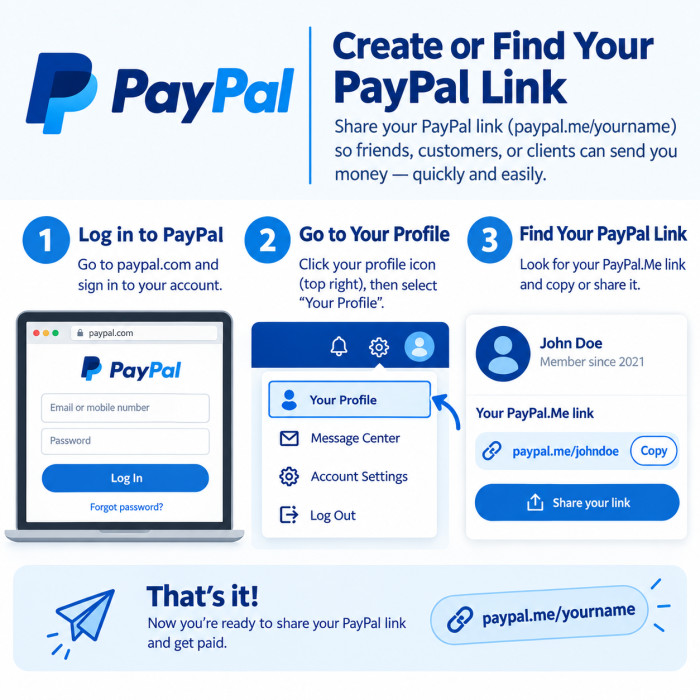
Step 1: Log In to PayPal
Go to PayPal and sign in to your account.
Step 2: Open Your Account Settings
Navigate to your profile or account settings area. Your PayPal.Me link should be listed in your profile settings if you already have one.
Step 3: Copy and Share Your Link
Once you find your PayPal.Me link, copy it and share it with anyone who needs a way to send you a payment.
How Supporters Use Your PayPal.Me Link
When someone receives your PayPal.Me link, they can:
- Open your link.
- Enter the amount they want to send.
- Review the payment details.
- Complete the payment through PayPal.
Using Your PayPal.Me Link With FreeFunder
Once you have your PayPal.Me link, Contributors to your FreeFunder campaign can make direct payments using your PayPal link, which will avoid any payment processing fees that would otherwise be required when using debit or credit card.
For more information about how FreeFunder’s off-platform donations work, read our full guide here.